Role Based Access Control
Enhance security and streamline access management by assigning user permissions based on roles. Simplify administration and ensure individuals have the necessary access rights for their responsibilities with Role-Based Access Control (RBAC).
.png)
What Is Role Based Access Control?
Identity and Access Management (IAM) Role Based Access Control (RBAC) is an effective security framework that enables organizations to efficiently manage access rights within their IT systems.
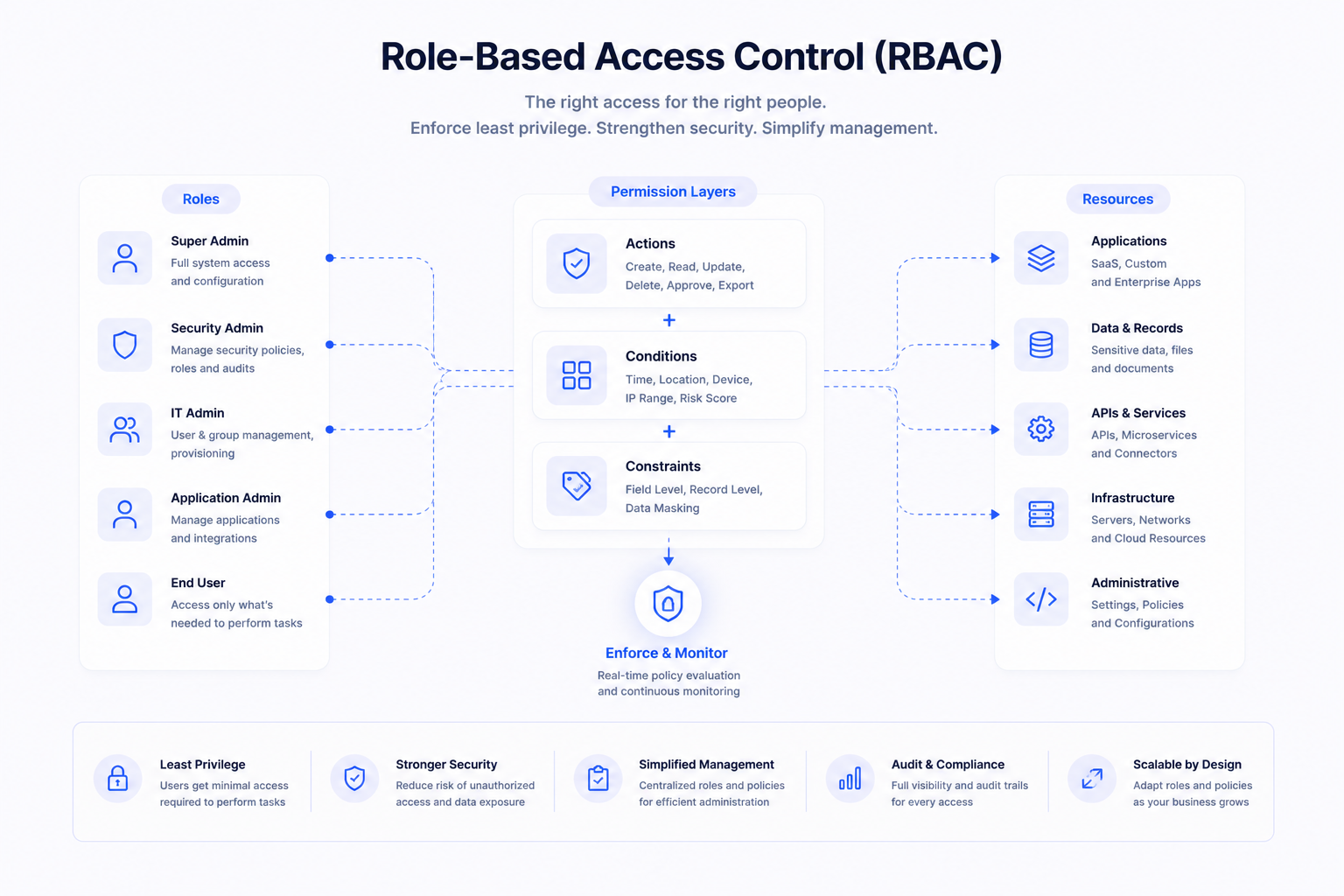
RBAC is a feature of IAM systems that secure the access of users to certain resources or applications on the basis of their individual roles within an organization. This system helps organizations maintain an appropriate level of security by limiting user access to the resources they need for their job roles.
RBAC meaning is to simplify and streamline access control processes, done by mapping users, or groups of users, with specific roles, and assigning privileges based on that role.
As a result, organizations can quickly grant or restrict access rights on an individual basis without having to go through a lengthy authorization process.
This not only helps to improve security, but also saves time and resources by reducing the amount of manual work required for access control processes.
How to setup roles
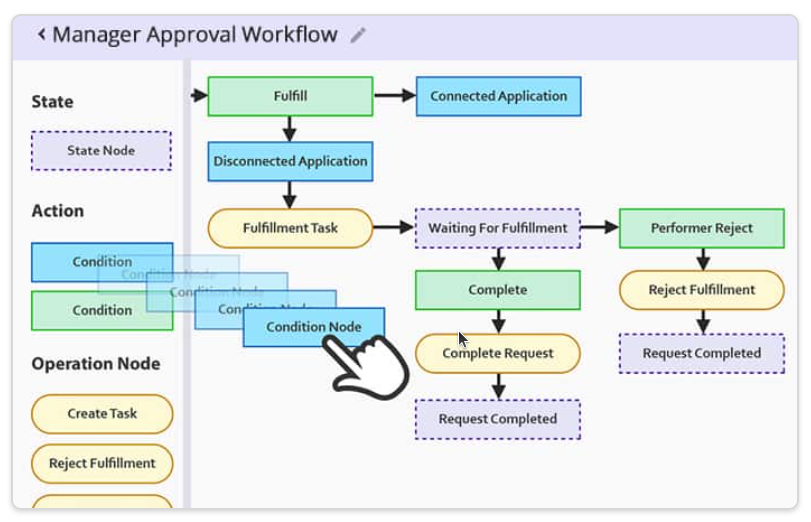
Here are the management steps that take place in the utilization for a new role onboard
Define Role Identity
Create a role name, description, owner, and business purpose for clarity and governance.
Select Target Applications
Choose connected applications and systems where this role will grant access.
Add Entitlements & Permissions
Assign specific permissions, groups, and privileges required for the role.
Configure Approval Workflow
Set multi-level approval rules, escalation paths, and access request policies.
Apply Conditions & Policies
Define conditional access rules such as department, location, or risk level.
Set Lifecycle Rules
Configure provisioning, deprovisioning, and automatic updates based on user changes.
RBAC in Sath Cybersecurity space
Role Based Access Control Best Practices
These key best practices help organizations establish and maintain an effective Role-Based Access Control system, enhancing security and access management.
- Clear Role Definitions: Clearly define roles based on job responsibilities and functions.
- Least Privilege Principle: Assign the minimum necessary permissions for each role to reduce the risk of unauthorized access.
- Access Reviews: Periodically conduct an access review, ensuring role assignments align with organizational changes.
- Segregation of Duties (SoD): Avoid conflicts by ensuring that no single role has conflicting or sensitive permissions.
- Single Pane Of Glass: Manage roles centrally to ensure consistency across systems and applications.
- Compliance and Reporting: Implement robust logging, auditing, and monitoring to track role changes and detect security incidents.
- User Lifecycle Management: Develop effective processes for onboarding, offboarding, and role changes to maintain accurate access control.
- Use Connectors to help automate the provisioning to user accounts with Roles.
.webp)
Features of Role
IDHub Role Based Access is a flexible and powerful tool used to assign resources to users based on their attributes. IDHub admins are the only users who have access to the Role Based Access tool.
- Wizard-Based Role Creation
Create roles using a guided, step-by-step interface that simplifies complex configurations. Admins can define applications, entitlements, approval flows, and lifecycle rules without navigating multiple screens.
- Conditional-Based Role Queries
Build dynamic roles using attribute-based conditions such as department, designation, or location. Roles automatically adjust as user attributes change, ensuring real-time access alignment.
- Birthright Roles
Automatically assign predefined roles to users when they join the organization. Ensures Day-1 access readiness while maintaining governance and policy compliance.
- Bulk Role Upload Tool
Quickly create or update multiple roles using structured file uploads. Ideal for large enterprises migrating legacy role models into IDHub.
- Manage Roles
View, edit, clone, disable, or retire roles from a centralized dashboard. Maintain full visibility into role ownership, entitlements, and usage across systems.
- Easy Creation With No Technical Experience Needed
Designed for business administrators with zero coding knowledge required. Intuitive workflows and visual configuration eliminate dependency on IT teams.
Role Based Access Control Vs Attribute Based Access Control
Attribute-Based Access Control (ABAC) varies slightly from Role-Based Access Control (RBAC). RBAC provides user access to resources, based on Role assignment, where ABAC provides user access to resources, based on resource attributes and user attributes.
However IDHub can accommodate both simultaneously.
This added layer of security allows systems to have more granular control over its users, and protect against outsiders using a compromised user account maliciously.
IDHub includes many out-of-the-box schema attributes. Any custom attribute can be created and added to the schema.
Location Based Access Control
Suppose a user is newly onboarded, has a job title change, a department change, or a location change.
IDHub will recognize the user attribute change, and automatically grant or revoke Role access according to the conditions configured within the Roles.
IDHub matches the resource attributes within the Role, against the user account information, then appropriately provisions or deprovisions the resources which are assigned to the Role.
Role Based Permissions
Role-based permissions refer to the practice of assigning access rights and privileges to users based on their roles within an organization.
Instead of granting permissions to individual users, permissions are associated with specific roles, and users are then assigned to those roles.
This approach simplifies access control and administration, as users with similar responsibilities or functions share a common set of permissions tied to their roles, making it easier to manage and maintain security.
Cyber Security Tools